 |
FREE !!! |
|
|
|
FREE !!! |
|
*** Click Here to checkout the NEW OFFICIAL website for Monitor Dot! ***
10/24/22 - Story
behind this
app:
For a long time there was a popular app that was free to use by everyone. Then
recently the app suddenly displayed a message stating that a mandatory update
was required.
This update basically changed the app into a trial version that expired within
hours after installing it. To continue using the app, the company now wants a
monthly fee!
So, because they got greedy and
decided to screw over their users by disabling everyone's app without notice, I
decided to return the favor by creating my own app and giving it away for
FREE!*
Their loss, your gain.
...and please enjoy my
retro webpage design :)
Check out TechDoctorUK's review of VPN Monitor Dot:
How will VPN Monitor Dot help protect my Privacy?
VPN's help protect your privacy when you are on the internet. But they can only
do that when they are working properly.
Even if a VPN has it's "Auto-Start" feature enabled,
there is no guarantee that it will properly run 100% of the time when you power
on/bootup your device.
And even when a VPN is running properly, it may
suddenly disconnect or crash even hours later without giving you any warning!
This is why using VPN Monitor Dot
is so important
VPN Monitor Dot will continuously monitor your VPN connection and let you know it's working by displaying a status "Dot" in the top right corner of your screen...
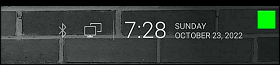
When you ARE being protected by your VPN, the app will slowly flash a GREEN dot:
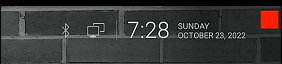
But when you are NOT being protected by your VPN (because the VPN is not turned on or it crashed), then the app will slowly flash a RED dot:
----- VPN Monitor Dot vs. the
"Other Guy's" app -----
1) Why does the "Other Guy's" app need
Read/Write Access Permission to my device's photo/files Storage?
I have no idea why the other app
needs it, but keep in mind
that because their
app also has internet access,
it could theoretically add/delete or
send your files to a remote cloud server without your knowledge or approval!
VPN Monitor Dot does not need this potentially dangerous permission
in order to fully protect you :)
2) VPN Monitor Dot was designed in a highly
efficient way to minimize it's memory/resource footprint.
Just see the
difference for
yourself:
|
The Other Guy's ---- vs. ---- VPN Monitor Dot APK
size: |
Size does matter, and being x100
TIMES
BIGGER is NOT a good thing!
Why is Smaller Better?
Because VPN Monitor Dot uses very little resources when running, it has a much higher chance of
staying loaded in memory whenever
Android decides to start killing processes to free up
resources.
That means VPN Monitor Dot will be able to stick around to help keep you protected.
The last thing you want is for your VPN to crash and never know it because the
monitoring app was killed!
IMPORTANT NOTES:
|
Installation:
|
Need additional help with installation?
Click here
for an easy tutorial from Troypoint.com!
Mark loved old tech. While everyone else was buying cloud-based, subscription-only cameras, Mark preferred the "vintage" reliability of a 2010-era Windows XP machine hooked up to an old USB webcam. He ran , the staple software of the era.
Eventually, the era of the DIY webcam server died. Windows XP gave way to Vista, then Windows 7. The old Pentium 4 tower was relegated to a closet, and eventually, the e-waste recycling center. WebcamXP became obsolete, replaced by integrated IP cameras that pair with an app in thirty seconds. My Webcamxp Server 8080 Secret-32
WebcamXP was once a dominant force in the private surveillance and webcam streaming market. While newer, cloud-based software has largely taken over, many hobbyists and security enthusiasts still maintain legacy systems. If you are troubleshooting or configuring a server under the "My Webcamxp Server 8080 Secret-32" parameters, you are likely dealing with a specific port configuration and an internal security string or hash. WebcamXP Mark loved old tech
To view your camera from outside your home (like on your phone while at work), you must tell your router to send incoming requests on Port 8080 to your server. Log in to your router’s admin panel. Port Forwarding Create a rule for Port 8080 (TCP) and point it to the Static IP you set in Step 1. (Optional) If you want audio, you typically need to forward Port 8090 (TCP) Step 3: Dealing with Changing Public IPs Triggers recording or email notifications on motion